As an Amazon Associate, we earn from qualifying purchases. Some links on this site are affiliate links at no extra cost to you. Our recommendations are based on thorough research and editorial judgment.


Cloud vs Local Storage: What Happens When Upload Fails

When uploads fail in cloud storage, it often happens due to weak internet connections or server issues. You might experience frustrating timeouts or interruptions during your file transfers. In contrast, local storage allows you immediate access to files, minimizing these risks. Here are key points to remember:
- Upload failures can occur with large files.
- Local storage avoids network problems.
- Cloud services often have built-in recovery options.
You may be interested



Stay tuned, as we’ll explore more about these storage choices and their benefits.
Key Takeaways
- Upload failures in cloud storage can occur due to weak internet connections, resulting in frustrating interruptions for large files.
- Local storage allows immediate access to files offline, preventing issues caused by upload failures.
- Automatic resumable upload features in cloud services can help recover from failed uploads, minimizing data loss.
- Local storage requires proactive backups, as upload failures can lead to permanent data loss without sufficient protection.
- Cloud storage may have hidden fees and cost implications, while local storage provides long-term savings with no ongoing charges.
Understanding Cloud Storage Challenges

Hey there! Let’s chat about cloud storage for a moment. It’s super useful, but there are definitely some challenges you might bump into. For starters, you might experience upload failures—imagine trying to send a big file and suddenly losing your internet connection. That can be pretty frustrating, right?
Another thing to remember is data transfer speeds. Sometimes, if many people are using the same network, it can feel like dragging a heavy suitcase up a hill trying to upload files. You might notice that it takes a lot longer than usual. And speaking of sizes, pay attention to file size limits. Many cloud providers only allow files of a certain size. So, if you try to upload a massive video and it exceeds this limit, the upload might fail without you even knowing why!
Then there are synchronization issues. If your upload goes haywire, it can leave your files feeling disconnected, making it tricky to figure out what’s latest—your local version or what’s stored online. Don’t forget, if you have to retry uploads or need help recovering lost data, those additional costs can also sneak up on you. For wildlife monitoring purposes, using cameras with cloud storage options can help mitigate data loss when upload problems occur.
How Upload Failures Occur in the Cloud

You know how frustrating it can be when you try to upload something to the cloud and it just doesn’t work? Upload failures can really throw your plans off course, especially if you’re depending on that cloud storage. Let’s break down why these hiccups happen.
First off, if your internet connection is shaky—maybe it’s slow or just unpredictable—that can cause your uploads to fizzle out before they finish. Imagine trying to send a big video file over a spotty Wi-Fi connection; chances are it’s going to fail halfway through. There are also bandwidth limits to think about. Large files may be too much for your connection to handle at once, which can lead to annoying timeouts.
Sometimes, the cloud service itself might have issues. Just like a café may close for maintenance, your cloud provider can experience outages. This can happen unexpectedly, leaving your uploads stuck. When something goes wrong, you might see error codes pop up. Don’t ignore those—they’re incredibly helpful for figuring out what happened.
Many services nowadays offer an automatic resumable upload feature. This means if your upload fails, it can pick up right where it left off next time, which is a real lifesaver. So next time you’re in the middle of an upload and it doesn’t go smoothly, you’ll know why and might even have a tool to smooth it out. Keep an eye on your connection and don’t hesitate to check error codes when things go awry! Additionally, devices with advanced night vision technology sometimes rely heavily on stable uploads to ensure timely delivery of wildlife monitoring images.
What Happens During Upload Failures Due to Connectivity Issues?

Hey there! I know how annoying it can be when you face upload failures due to connectivity issues. It can really throw a wrench in your plans. So, let’s break down what happens during these hiccups. When your internet connection gets choppy, you might end up with incomplete files that just can’t be used until everything finishes uploading. Or worse, you could end up with corrupted files, which might need you to start from scratch.
Fortunately, a lot of cloud services now come with automatic resume features. This means that if your upload drops, they try to pick up right where it left off instead of making you start all over again. For instance, if you were uploading a hefty video, you don’t have to redo all the progress you’ve made—just the part that cut out. But, a weak internet connection can still slow things down and make those larger uploads more likely to fail.
To reduce those frustrating upload failures, it’s a good idea to check your internet strength before diving into big uploads. If you can, try using a wired connection—it’s often more stable than Wi-Fi and can handle larger files more smoothly. This intentional preparation can save you so much time and headache in the long run. Next up, let’s explore some more tips on optimizing your upload process! Understanding storage capacity also helps manage where to store your images and videos effectively.
Comparing Local Storage: Key Differences
Local storage really stands out when you compare it to cloud storage. For starters, one of the biggest perks is immediate data access. This means you can grab your files anytime, even if you’re offline. Imagine working on a project in a coffee shop where the Wi-Fi drops—local storage lets you keep going without missing a beat.
Another cool thing about local storage is the control it gives you over file management. You’re in the driver’s seat! If an upload fails because of a glitch, you can quickly troubleshoot the issue without waiting around for customer support from a cloud provider. It’s like having your own personal IT department at your fingertips.
And let’s talk about backups. With local storage, you’re the boss of your backup protocols. You choose when you want to back up your files and how you want to do it. For instance, you might set a reminder to back up your important documents every Friday evening. This way, you know your precious data is secure on your terms.
You’re also free from worrying about third-party server outages. If there’s a problem on their end, it won’t affect your ability to get to your data. You can resolve upload failures and access your files without delays.
Additionally, local storage solutions offer enhanced reliability in rugged outdoor conditions, similar to devices with IP66 weatherproof ratings, ensuring your data remains safe even in harsh environments.
With all these benefits, it’s clear why many people still prefer local storage for keeping their data safe and accessible. Now, let’s explore some of the popular ways to implement local storage effectively!
Recommended Products

TAA Compliance: Our USB-C external SSD meets strict Trade Agreements Act (TAA) standards, making it a trusted choice for government procurement, and ensuring your data solution is both secure and regulation-ready

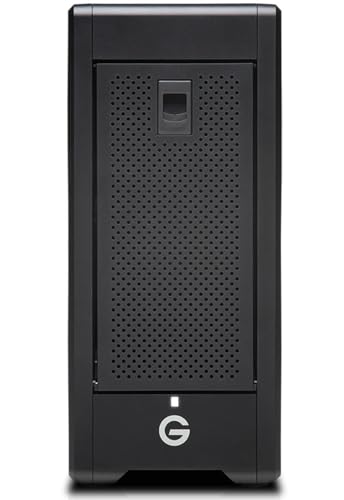
Transportable design takes you from studio to location and back
Advantages of Local Storage in Reducing Upload Failure Risks
When we talk about the advantages of local storage, one big plus is how it really lowers the chances of upload failures. Since local storage doesn’t depend on your internet connection, you won’t have to worry about losing access to your data if the internet goes down. This can be a game changer, especially when you’re in the middle of a big project or trying to send important files.
So, let’s break this down a bit. First, you can set up tailored backup systems that fit your specific needs. For example, if you’re working on a research project, you might back up just the files you need for that project regularly. This means fewer worries about losing everything if something goes wrong during an upload.
Then there’s speed. With local servers, data transfers happen much quicker. Think about how frustrating it is to wait for a cloud upload to finish when you could have just copied the files to a hard drive in seconds. Fast transfer speeds keep you moving without those annoying bottlenecks.
Another major benefit is the added security for sensitive data. Keeping your information on-site means it’s less likely to be compromised while being transferred over the internet. Picture this: if you’re dealing with client information, having it stored locally can significantly reduce your risk of a data breach.
Lastly, with local storage, setting up backup options is straightforward. You can create multiple copies of your data, so even if one upload fails, you’ve got another safety net ready to go. It’s like having an insurance policy for your files.
In a world where upload failures happen, understanding these benefits of local storage can really give you peace of mind. It sets a solid foundation for managing your data effectively, allowing you to focus more on your tasks and less on tech troubles. Moreover, customizable alerts can help you monitor data transmission in real time to avoid unexpected failures.
So, what else would you like to know about data management?
Recommended Products

(1) 1GB = 1 billion bytes and 1TB = 1 trillion bytes. Actual user capacity may be less depending on operating environment.

The External Hard Drive includes both USB-C and USB-A Cables to make your out-of-box experience great. Ready for any USB-C or USB-A ports on your computer, laptop, or other systems with USB support. Full USB 3.2 Speeds up to 5MBs.

The External Hard Drive includes both USB-C and USB-A Cables to make your out-of-box experience great. Ready for any USB-C or USB-A ports on your computer, laptop, or other systems with USB support. Full USB 3.2 Speeds up to 5MBs.
Assessing Data Loss Risks: Cloud vs. Local Storage
When it comes to figuring out the risks of data loss, especially between cloud storage and local storage, it’s really important to consider what happens if things go wrong. Imagine you’re trying to upload a crucial document to your local drive, and suddenly the upload fails. If you didn’t back up that file somewhere else, it could be gone forever—that’s a pretty scary thought.
On the flip side, when you use cloud storage, the chances of losing your data are significantly lower. Cloud providers usually have systems in place that back up your files automatically and store them across multiple servers. For instance, if you accidentally delete a file or there’s a server issue, many cloud services allow you to recover that file quite easily. So, for something as critical as your family photos or an important work presentation, the cloud might give you a bit more peace of mind.
In contrast, with local storage, you have to be really proactive about protecting your data. If you’re relying solely on a personal computer and an upload goes haywire, it can be tough without a backup plan. That’s why it’s crucial to think about how you’ll secure your data, whether that means using an external hard drive or a reliable backup software.
Understanding these differences can help you make more informed choices about where to store your important files, allowing you to safeguard against potential risks in the future. For wildlife monitoring technology, integrating cameras with cloud storage options can also facilitate easier management and access to your data remotely.
So, let’s move on to explore the pros and cons of both options in more detail!
Effective Strategies to Mitigate Cloud Upload Failures
Hey there! If you’ve ever struggled with cloud upload failures, you’re not alone. It’s frustrating when you’re trying to send important files and they just won’t go through. Luckily, I’ve got some simple strategies up my sleeve that can really help smooth out the process.
First off, make sure you have a solid internet connection. A reliable, high-speed connection is key because it reduces the chances of timeouts. Think about it like this: when you’re uploading a large photo or video, a slow connection is like trying to fill a bucket with a tiny trickle – it just takes forever!
Another nifty trick is to use incremental uploads. Instead of sending off a massive file all at once, break it down into smaller pieces. This way, if one part fails, the rest can still go through. It’s kind of like sending multiple postcards instead of one giant letter — if one postcard gets lost, you still have the others that made it.
Keeping an eye on performance is also super helpful. Just pop into your cloud storage provider’s dashboard now and then to check for any alerts or performance issues before you start uploading. That way, you can tackle problems upfront instead of getting caught off guard.
And if you can, consider using automated backup solutions. They keep your files synced without you having to lift a finger, which cuts down on both errors and interruptions. It’s like having a personal assistant to ensure everything is backed up and ready to go.
Lastly, look into data transfer acceleration services, especially if you’re uploading during busy times. These services can optimize the route your data takes, making uploads much quicker.
For organizations relying on remote monitoring, having a 4G LTE connectivity backup system can help prevent data loss during upload failures.
Recommended Products

The SonicWall Network Security appliance (NSa) Mid-Range Firewall is next-generation security designed specifically for businesses of 250 users and up.
The SonicWall Network Security appliance (NSa) Mid-Range Firewall is next-generation security designed specifically for businesses of 250 users and up.

SonicWall Advanced Protection Service Suite for TZ470 - 5 Year License (02-SSC-6397)
How Local Storage Prevents Upload Issues
Hey! So, let’s chat about local storage and how it can really save you from those pesky upload issues that sometimes come with cloud services. With local storage, you have instant access to your files, which means you don’t have to depend on a shaky internet connection. This can really reduce those frustrating moments when the network drops right as you’re trying to upload something important.
One of the best things about local storage is that you have complete control over your data. For example, if you’re working on a big project, you can organize everything just the way you want without having to worry about how it’s set up in the cloud. Plus, you can create customized backup processes that ensure your critical files are safe, no internet required. Imagine saving your important documents onto an external hard drive, knowing you have them stored securely.
You can also keep an eye on how well your storage is performing, which helps you spot any issues before they become real problems. Because local storage isn’t tied to external servers, the chance of failure during uploads is significantly reduced, lowering the risk of data loss. So, if you value reliability in your data management, local storage can be a solid option worth considering. Additionally, implementing maintenance routines can optimize storage performance and prolong the life of your equipment.
Now, let’s look at how backup strategies can further protect your precious data…
Robust Backup Solutions for Security and Accessibility
Hey there! You know, when it comes to keeping our data safe, having robust backup solutions is super important. I mean, a combination of cloud storage and local storage can really save the day. Think about it: if your computer crashes, you don’t want to lose all those photos or important documents. So having one backup at home and another in the cloud means if one fails, the other is there to spring into action.
Let’s chat about why these solutions really matter. First off, accessibility is a big win—you can grab your files any time you need them, whether you’re at home or on the go. Plus, in case of a disaster, like a computer failure or even a fire, you can easily bounce back and recover your files with minimal hassle. And don’t forget about compliance! If you’re running a business, storing your data properly helps you meet necessary legal requirements.
Have you ever experienced an upload failure? It’s frustrating, right? That’s where automatic backups shine—they help ensure you don’t lose anything important. Imagine setting it up once and then just forgetting about it, knowing your data is covered.
Using a hybrid storage model really gives you the best of both worlds. You get that quick access at home while also having secure backups stored safely offsite. Just make sure to check in on your backup solutions regularly to confirm they’re running smoothly and still meet your needs. Trust me, that peace of mind is worth it! Many modern devices now include features like unlimited cloud storage combined with local recording to enhance data reliability.
Now, let’s explore how to choose the right tools for your backup plan.
Recommended Products

Colossal capacity and high performance in a transportable design

Eight universal 2.5 or 3.5-inch SSDs/HDDs drive bays w/ Dual Thunderbolt 3 ports (Thunderbolt 2/Thunderbolt backward compatible)

Based on TitanRidge Intel’s latest Thunderbolt chip Pegasus32 has great new features expanding your connectivity
Choosing the Right Storage Option for Your Needs
When you’re trying to decide between cloud and local storage for your data needs, it really comes down to a few key factors. First off, think about accessibility. With cloud storage, you can reach your files from anywhere as long as you’ve got internet access, which is super handy if you’re on the go. On the other hand, local storage keeps your data tied to a specific machine, so if you need to work from multiple locations, that could be a bit of a hassle.
Scalability is another important point. If you go for cloud storage, you can easily adjust your storage space up or down without needing to buy new hardware. For example, if you’re a small business that suddenly grows and needs more space, you can just upgrade your plan. But with local storage, expanding means investing in more physical devices.
Cost is definitely something to weigh as well. While cloud storage might seem cheaper at first, don’t forget about potential hidden fees. Local storage usually has those upfront costs, but it can save you money in the long run since you won’t have monthly fees piling up.
Let’s not forget about security. Local storage gives you hands-on control, but if something happens to your device—like a natural disaster or accidental damage—you risk losing everything. Cloud storage uses security measures put in place by experts, but it can sometimes be susceptible to data breaches.
Finally, think about redundancy and disaster recovery. Cloud solutions often come with built-in backups, so you’re less likely to lose important information. But with local storage, you’ll need to set up your own plans to ensure your data is safe.
In certain cases, device compatibility and network connectivity can also impact how effectively cloud or local storage solutions perform, especially for devices like cellular trail cameras.
The choice between cloud and local storage really comes down to what suits your lifestyle and needs best. So, have you thought about what you value more—accessibility, security, or cost? That will guide your decision when it comes to managing your data!
Frequently Asked Questions
What Is the Best Reason for Using Cloud Storage Instead of Local Storage?
We believe cloud storage offers the best benefits, like reduced costs and easy access, along with enhanced collaboration, automatic backups, improved security, scalable solutions, and centralized management for effective data recovery and version control, perfect for remote work.
What Is One Advantage to Storing Files in the Cloud vs. Storing Files Locally?
One advantage of cloud storage is its accessibility benefits. We enjoy cost effectiveness, automatic backups, and enhanced security measures. Plus, remote access and collaboration tools make data synchronization and online sharing incredibly convenient for us.
What Are the Disadvantages of Using the Cloud for File Storage?
While cloud storage offers benefits, we face serious disadvantages like security concerns, privacy issues, and vendor lock-in. Additionally, data accessibility may suffer due to bandwidth limitations, compliance regulations, and potential backup challenges affecting cost implications and service reliability.
Is Cloud Storage Safer Than Local Storage?
We believe cloud storage’s data encryption and redundancy offer better safety than local options. However, we should consider physical security, accessibility issues, privacy concerns, and vendor lock-in when evaluating overall reliability and cost-effectiveness.